Skip to content
Missionary Tracker

Built for missionary families

LDS Missionary Tracker for Families

Stay close to their service, wherever they serve.

A free LDS missionary tracker app for following your missionary’s countdown, serving area and updates — on one private profile the whole family shares with a join code.

  • Mission countdown
  • Where they're serving
  • Shared with family
  • Free on iPhone & Android
  • Private profiles, shared by join code

Try the missionary countdown calculator

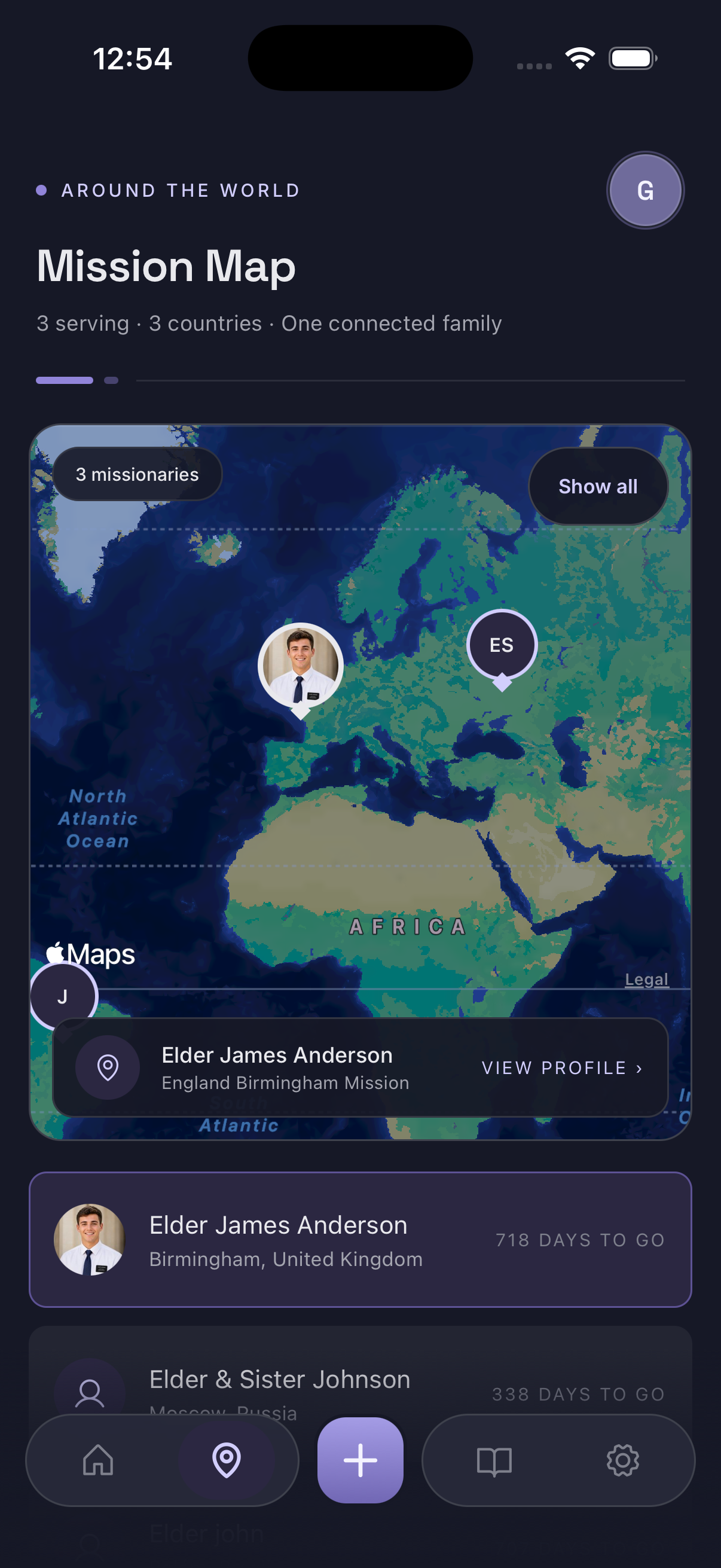
LDS Missionary Tracker map showing the areas where three missionaries are serving
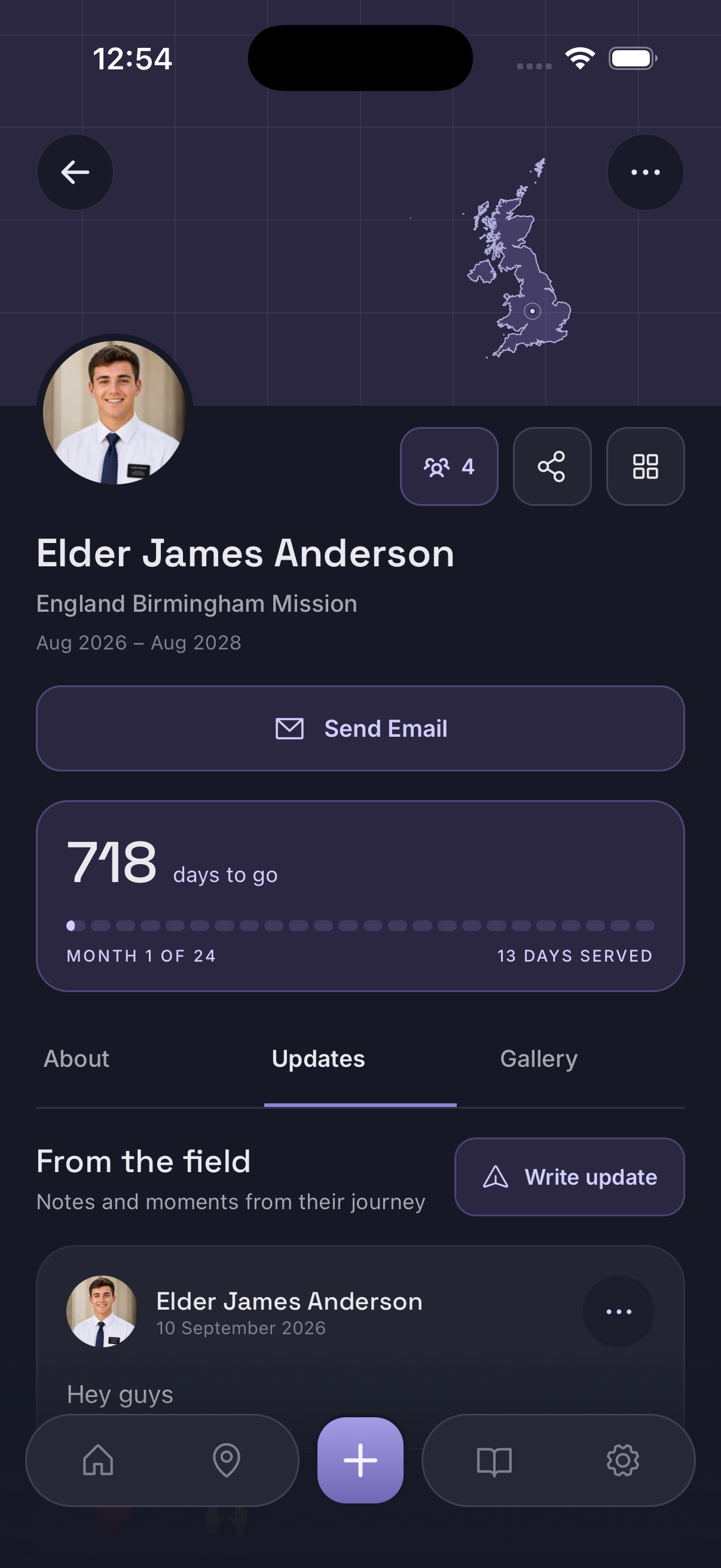
Missionary Tracker app showing an LDS missionary's mission progress and countdown

Mission progress

Track Your Missionary's Journey

days to go
718
days served
13
of 24
Month 1

The example profile shown here, 13 days into a 24-month mission. Every profile shows its own figures, worked out from the dates on it.

Every missionary profile opens on the numbers families actually ask about. You see the date they entered the field, their expected release date, how many days they have served, how many days remain, and how far through the mission they are — all on one card that updates itself each day.

That single view replaces the mental arithmetic most families end up doing. Instead of counting weeks on a calendar or asking someone else to work it out, the missionary countdown is simply there when you open the app, and it says the same thing for everyone following that profile.

Because the progress bar is tied to real dates rather than a rough estimate, it doubles as a missionary progress tracker for the moments worth marking — the first month in the field, six months, the halfway point, the final transfer.

Explore the missionary countdown
Missionary Tracker app showing LDS missionary mission progress, days served and countdown to the expected release date

Serving area

See Where Your Missionary Is Serving

A mission name on a call letter is hard to picture. The map view puts it on the globe: each missionary you follow appears as a pin on the area they are serving in, with their mission listed underneath. Tap a name and the map centres on them.

For families with more than one missionary out, the same screen shows everyone at once — one in Birmingham, one in Moscow, one in Córdoba — which makes the scale of what they are doing much easier to hold in your head. It is a missionary map in the geographic sense: where in the world they are, and how far that is from home.

The map reflects the area a missionary is assigned to, based on what has been added to their profile. It is not live GPS and it does not follow anyone’s phone.

See how the missionary map works
LDS Missionary Tracker map showing the areas where three missionaries are currently serving

More than one

Follow Multiple Missionaries in One Place

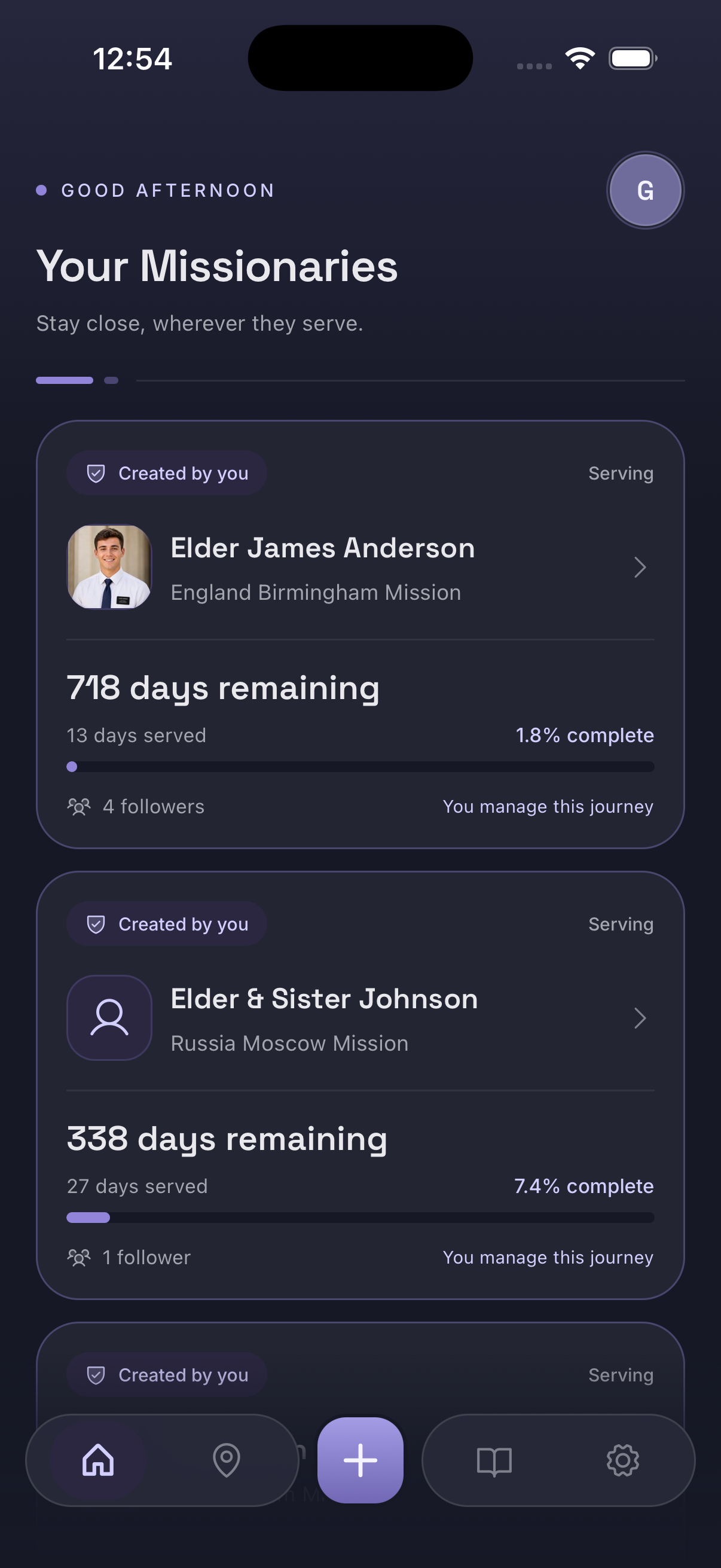
Families often have two or three out at once — a son, a daughter, a cousin, a close friend from the ward. Every missionary you follow sits in the same list, each with their own countdown, days served and percentage complete, and the map view shows all of them together.

Two missions with different start dates and different time zones stop competing for the same corner of your memory. The list tells you at a glance who is nearly home and who has only just arrived.

Read how families keep track of several missionaries
Missionary Tracker home screen listing several missionaries, each with their own countdown and progress bar

How sharing works

One Missionary. The Whole Family Connected.

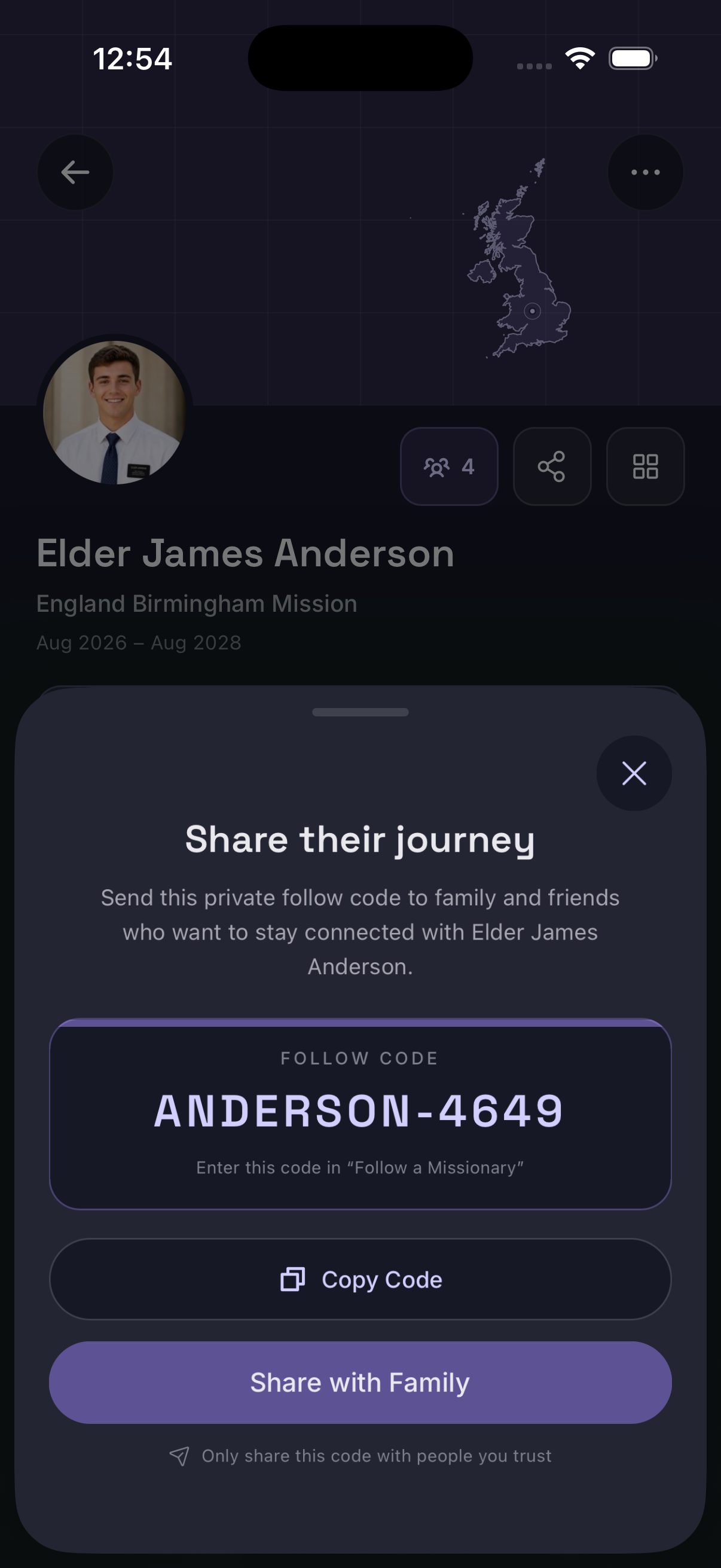
A missionary profile is created once and then shared with a private join code. Everyone who enters it follows the same mission, in three steps.

  1. Create the missionary profile

    One person — usually a parent — adds the missionary’s name, their mission and their dates.

  2. Share the private join code

    The profile has its own join code. Send it to whoever should be able to follow along — nobody else can find the profile without it.

  3. The family joins

    Dad, grandparents, siblings and friends enter the code once. From then on everyone sees the same countdown, the same serving area and the same updates.

Missionary Tracker app sharing a private follow code so family and friends can follow the same missionary

Local time & weather

Know Their Local Time and Weather

Missionary Tracker shows the current local time and weather where your missionary is serving, so a time zone difference stops being something you have to work out in your head.

Their time, not yours

A glance tells you whether it is early morning where they are, the middle of a proselyting day, or close to the end of it — useful before you send a letter or plan a call.

Weather where they serve

Current conditions in their area give the small, ordinary detail that makes their day easier to picture. A humid summer in Brazil reads differently to a wet week in Birmingham.

Updates

Keep Everyone Updated

Each missionary profile has an Updates tab alongside their mission information. When something is worth passing on — a transfer, a new companion, a photo from a p-day, a line from the weekly letter — it can be posted to the profile instead of retyped into four different conversations.

Everyone following that missionary sees the same updates in the same place, in order. Grandparents who are not in the family group chat are not left out, and nobody has to be the designated person who forwards everything on.

Read more about sharing missionary updates

Written updates

Short notes from the letter home, kept with the mission they belong to.

A running timeline

Updates stay on the profile in order, so the mission reads as one story rather than scattered messages.

Features

Everything You Need to Follow Their Mission

Everything on this page, in one list.

Mission countdown

Days served, days remaining, percentage complete and the expected release date — updated daily.

Learn more

Mission map

A pin on the area each missionary is serving in, for everyone you follow.

Learn more

Local time

What time it is where they are serving, without the mental time zone maths.

Current weather

Conditions in their area today — a small detail that makes the day real.

Mission updates

Post news and photos once and let everyone following see them.

Learn more

Private join codes

One code adds a missionary to someone else’s app. Nothing is publicly browsable.

Family sharing

Parents, siblings, grandparents, friends or a whole ward — all following free.

Multiple missionaries

Follow everyone your family has in the field from one list.

Privacy

Private by Default

Missionary profiles are not meant to be public. There is no directory to browse and no way to search for someone else’s missionary inside the app. The only way to follow a missionary’s journey is to be given their join code.

That keeps the decision where it belongs. The person who created the profile chooses who receives the code — one person, the immediate family, the extended family, or the whole ward — and also chooses how much to put on the profile in the first place. A family that would rather not include a photo or a specific area simply leaves it out.

It also means the people who normally find out last do not have to: siblings away at school, grandparents, aunts and uncles, close friends, a companion’s family. Nobody has to keep their own version of the mission dates, so the answer to “how long has she got left?” is the same wherever it is asked.

Please treat a join code the way you would treat any private link: share it with people you actually want following along.

Free tools

Free Missionary Tools, No Account Needed

Two tools that run entirely in your browser, whether or not you ever install the app.

Explore

Before There Is Anything to Track

Look up the mission itself, get ready to serve, or read how other families do this.

Why we built it

Built for Missionary Families

Missionary Tracker started with three relatives serving at the same time. Keeping track of where each of them was, how far through their missions they were and how long they had left turned into a recurring guessing game — three sets of dates, three time zones, three areas nobody could quite place on a map.

The app is the version of that we wished we had: one profile per missionary, shared with everyone who cares, with the map doing the work of putting a mission name somewhere real. Seeing the pin on the other side of the world changes how the distance feels.

Frequently Asked Questions

What is an LDS missionary tracker?

An LDS missionary tracker is a way for families to keep a missionary's mission details in one organised place instead of scattered across calendars, group chats and memory. Missionary Tracker holds a profile for each missionary with the date they entered the field, their expected release date, how far through the mission they are, the area they are serving in, the local time and weather there, and any updates the family has shared.

How do I track an LDS missionary?

Download Missionary Tracker, then either create a missionary profile yourself or ask whoever created it for the join code. When you create a profile you add the missionary's name, their mission, the date they entered the field and their expected release date, and the app works out the countdown and progress from there. If someone else already made the profile, entering their join code adds that missionary to your app so you see the same information they do.

Is Missionary Tracker free?

Missionary Tracker is free to download on iPhone and Android, and free to use as a follower — if someone has given you a join code, you can follow that missionary, see the countdown, serving area, local time, weather and updates, and follow as many missionaries as you are given codes for, without paying anything. Creating missionary profiles is the part that needs a Pro account. The person who sets a missionary up — usually a parent — upgrades to Pro once, and everyone they share the join code with follows along free.

Do I need to pay to follow a missionary?

No. Following is free. If a family member has sent you a join code, you download the app, enter the code and start following — there is nothing to upgrade and nothing to buy. Pro is only needed by the person creating and managing the missionary profile itself, so a grandparent, sibling or friend who just wants to follow along never needs it.

What does a Pro account add?

Pro is what lets you create and manage missionary profiles rather than only follow them. If you are the person setting up a missionary — adding their name, mission, entry date and expected release date, posting updates and sharing the join code with family — that is the Pro side of the app. Everyone you then share the code with follows that missionary on a free account.

Can multiple people follow the same missionary?

Yes. A missionary profile is created once and then shared. Anyone who has the join code can follow that missionary, and the profile shows how many people are currently following. Parents, siblings, grandparents and friends all see the same countdown, serving area and updates without anyone having to keep their own separate record.

Can an entire ward follow a missionary?

It can. There is no fixed limit built around family size — the person who created the profile decides who receives the join code, so it can go to one grandparent, to the immediate family, or to an entire ward or group of friends. Following is free for all of them.

Are missionary profiles public?

No. Profiles are not browsable or searchable inside the app. The way to follow a missionary is to be given that missionary's join code by the person who created the profile, which means the family controls who can see it. The profile owner also chooses how much detail to add in the first place.

Can I follow more than one missionary?

Yes. Missionary Tracker is built for families who have more than one missionary out at a time. Every missionary you follow appears in your list, and the map view shows all of them together so you can see where each one is serving.

Does Missionary Tracker show how long a missionary has left?

Yes. Each profile shows days served out of the total mission length, days remaining, and the percentage of the mission completed, alongside the date they entered the field and their expected release date. The numbers move on their own each day, so nobody has to recalculate them.

Is Missionary Tracker available for iPhone and Android?

Yes. Missionary Tracker is available for both iPhone and Android, and a profile shared by join code works the same way on either platform.

Keep their whole mission in one place

Create a missionary profile, share the join code with the people who care, and let everyone follow the countdown, serving area and updates together.

Free to download on iPhone and Android.